


Yahoo Weather: Forecast & Maps
4.2108.05K Reviews
App Specs
- Version
- 1.64.1
- Updated On
- License
- Free
- Downloads
- 10,000,000+
- Developer
- Yahoo
- Categories
- Weather
- Platform
- Android, iOS
Screenshots

 Analysis by AppCompare
I like a weather app best when it helps me make a small decision quickly: whether to take a jacket, shift a walk, or leave extra time for a wet commute. Yahoo Weather: Forecast & Maps aims to serve that everyday need with a visual forecast, local conditions, and map-based weather information. It is a free weather app from Yahoo, and I find its appeal is less about turning every user into a forecaster and more about making a quick check feel clear and approachable.
Free to use, with a clear value question
The app is free, so trying it does not require a purchase decision. That makes the practical question whether its presentation and tools fit your routine, rather than whether a paid tier is worth the cost. Yahoo Weather has a 4.4 average from around 1.5 million ratings, and it has been installed over 10 million times. Those figures suggest it has broad reach, but they do not tell me whether its forecasts will match conditions in every neighborhood; I would still compare what it says with what I see outside when timing matters.
What the visual approach adds
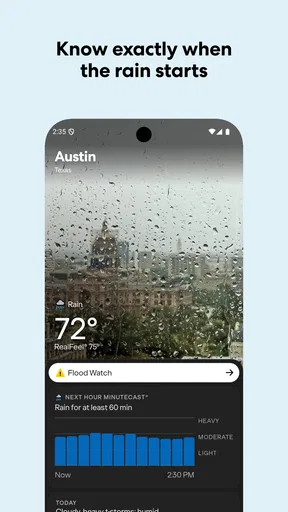
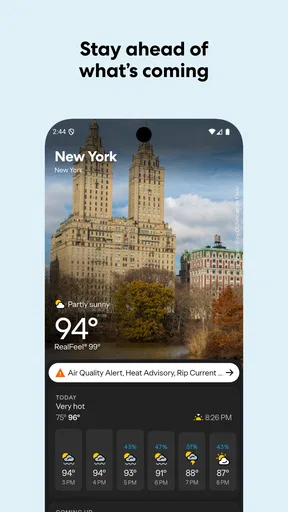
The interface gives weather information a more inviting feel than a plain list of temperatures. Location imagery can make saved places easier to recognize, while the forecast and map views offer different ways to answer the same question: what should I expect, and when might conditions change? The app’s hourly outlook is especially useful when a day has several moving parts. I can check whether rain is likely around the time I plan to leave instead of treating the whole day as simply wet or dry.
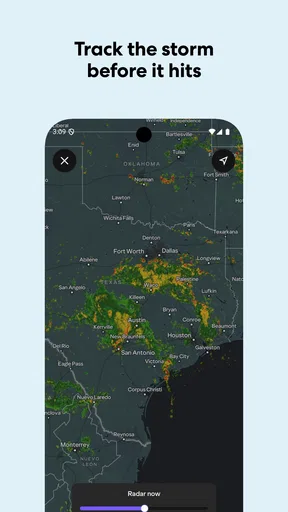
For a useful routine, I would check the hourly view before a commute, then use the radar when a shower seems close. Those views work best together: an hourly forecast helps with timing, while a radar map gives a visual sense of approaching weather. Neither view should be treated as a guarantee, particularly when a storm is developing quickly, but using them for different questions is more helpful than repeatedly refreshing one number.
Where it fits among weather apps
Compared with a minimal weather widget or the basic forecast built into a phone, Yahoo Weather offers a more visual way to explore local conditions and look at radar. That can be worthwhile if I want more context than the current temperature without opening a technical dashboard. On the other hand, people who need specialist tools, highly detailed model comparisons, or a workflow built around professional weather analysis may prefer a dedicated alternative. Yahoo Weather’s strength is convenient everyday checking, not replacing expert forecasting tools.
Small trade-offs that matter in daily use
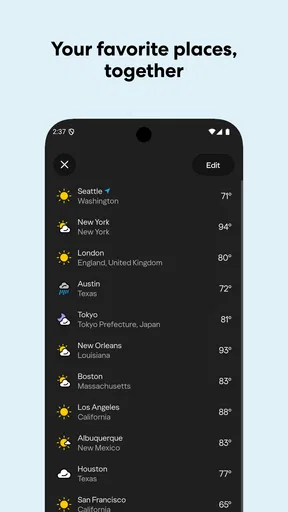
A photo-led design is attractive, but it can place more emphasis on presentation than a stripped-down forecast does. If I am standing outside in a hurry, I want the key condition and temperature to be easy to find; if I am planning ahead, the imagery and maps are more welcome. It is worth trying the app in both situations before deciding whether its style suits you. Multiple locations can also make travel planning easier, though keeping a long list tidy takes a little attention: I would keep home, work, and the places I am actively planning to visit, rather than saving every location I have ever checked.
Severe-weather information is useful as an extra prompt to pay attention, but I would not rely on one app as my only safety plan. For a serious storm, local official alerts and instructions should take priority. This is a sensible distinction for any consumer forecast: a convenient map can help me understand what may be moving nearby, while emergency guidance is a different responsibility.
Worth Reading Before You Choose

EA SPORTS FC Mobile 26 Is a Bigger Football Game, but It Takes Time

Flipboard Shows What News Apps Must Do Beyond the Feed

Switching to Android Auto Means Rethinking Your Driving Routine

Google Calendar Makes a Crowded Week Easier to Manage

Ludo King Makes the Most of the Minutes Between Plans

Baby Panda World Brings Quick Play to Modern Phones, but Its Game Library Feels Busy
Who is likely to get the most from it
I would recommend giving it a try if you like seeing weather on a map, check conditions at different times of day, or regularly switch between a few saved places. It also suits someone who wants a friendlier visual presentation than a compact phone widget provides. If you only need today’s temperature, the built-in weather option may be simpler; if your decisions depend on highly specialized forecasts, a more technical service is likely a better match.
For example, before heading out for a weekend visit, I would save the destination, compare its hourly outlook with home, and check the radar shortly before leaving. That sequence can help me choose when to travel and what to pack without pretending that a forecast can settle every detail. For an outdoor event, I would check again closer to the start rather than making a decision based on a forecast viewed days beforehand.
First Impressions and User Interface
When you first open Yahoo Weather: Forecast & Maps, you're greeted with a sleek and visually appealing interface. The app makes use of stunning imagery from Flickr, which is a nice touch. It’s like having a beautiful postcard update you on the weather. Navigating through the app is a breeze (pun intended), thanks to its intuitive design. This is especially handy when you’re in a rush and need quick info.
Features That Stand Out
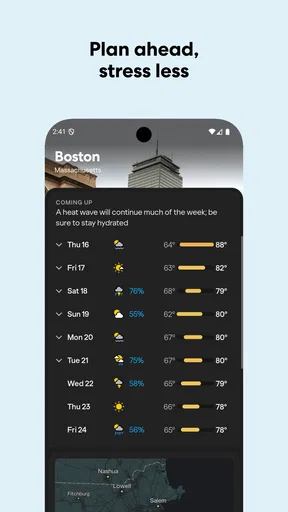
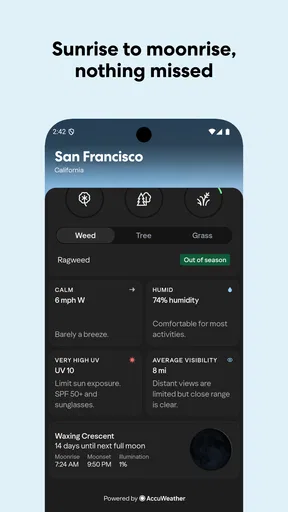
One of the standout features of this app is its detailed weather information. You get everything from the current temperature to a 10-day forecast. It even includes the "feels like" temperature, which is super useful for those days when the wind chill is no joke. The app also provides hourly forecasts, so you can plan your day with precision.
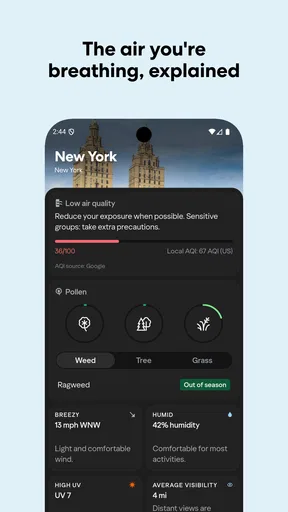
Another cool feature is the interactive radar maps. You can zoom in and out to see how weather patterns are moving. This is particularly useful if you’re tracking a storm or just curious about how weather systems work. There’s also a feature that offers wind, pressure, and precipitation details, which is perfect for weather geeks like me.
Ease of Use and Accessibility
Yahoo Weather scores high on ease of use. The app loads quickly and doesn’t bombard you with ads, which is a huge plus. The information is presented in a clear and concise manner, making it easy for anyone to understand. You can customize your experience by adding multiple locations, so you’re always in the know whether you’re at home or traveling.
Accessibility is another area where this app shines. It’s available on both Android and iOS, and the experience is consistent across platforms. The app supports a variety of languages, which makes it accessible to a global audience.
Reliability and Accuracy
Now, let’s talk about reliability. The app sources its data from reliable weather services, and in my experience, its forecasts are generally accurate. Of course, no weather app can predict the future with 100% certainty, but Yahoo Weather does a pretty good job. I’ve found it to be quite dependable, especially when compared to other weather apps I’ve used in the past.
That said, I treat a forecast as guidance rather than a promise. A useful habit is to check the timing again on the day I plan to go out, especially if I am making an outdoor plan around showers. A broad daily outlook can be enough to choose clothing, while a closer look at the hourly forecast and radar is more useful for deciding whether to leave now or wait. Local conditions can change quickly, so the app is most valuable as a way to revise a plan, not as a reason to assume the first forecast will hold.
Personalized Experience
One of the things I love about this app is how it makes the weather personal. By allowing you to add photos and share weather information, it creates a community feel. You can also customize notifications for severe weather alerts, ensuring you’re never caught off guard by sudden storms or temperature drops.
Notifications are most helpful when they reduce the need to keep checking the screen, but I would choose them selectively. If every change becomes a reason to interrupt the day, alerts can become noise rather than assistance. I would keep severe-weather notices enabled if I rely on them, then use the app itself when I want to inspect the forecast in more detail. For urgent warnings, I would also follow local official channels; a weather app is a useful companion, not a substitute for emergency instructions.
For people comparing phone weather apps, the choice often comes down to speed versus context. A built-in widget is hard to beat for a one-glance temperature check. Yahoo Weather makes more sense when I want a fuller visual view, several locations, or a radar check without moving to a specialist interface. If that extra context is not part of your routine, its more exploratory presentation may not add enough to justify switching from the simplest option already on your phone.
The app is rated for Everyone, and its current version is 1.64.1, with a minimum operating-system requirement of 7.0. It was released on October 5, 2010, so it is a long-running product rather than a new weather experiment. Yahoo is the developer. Those details matter mainly when checking compatibility and deciding whether you want an established general-purpose app; they do not remove the need to judge forecast usefulness in your own location.
My practical verdict is to try it if maps and a polished visual layout make weather easier for you to use. I would skip it if a bare-bones temperature display already answers your needs, or choose a specialist service if your plans depend on technical meteorological detail. For everyday decisions—packing a layer, choosing a departure time, or checking whether a storm is moving closer—it offers a useful set of tools at no charge. Yahoo Weather: Forecast & Maps is worth keeping when its visual approach helps you act on the forecast, rather than simply admire the screen.
Final Thoughts
In conclusion, Yahoo Weather: Forecast & Maps is a fantastic app that blends functionality with aesthetics. Its user-friendly interface, detailed forecasts, and reliable data make it a top contender in the weather app arena. Whether you’re a casual user or a weather enthusiast, this app has something for everyone. So, next time you’re wondering whether to pack that raincoat, give Yahoo Weather a peek. You won’t be disappointed!
Pros
- Beautiful and intuitive user interface.
- Accurate weather forecasts and updates.
- Detailed radar maps for weather patterns.
- Customizable alerts for severe weather.
- Integrates with Yahoo services seamlessly.
Cons
- Ads can be intrusive at times.
- Limited widget customization options.
- Requires internet for full functionality.
- Occasional delays in loading data.
- No offline mode for weather updates.
FAQs for Yahoo Weather: Forecast & Maps
What features make Yahoo Weather stand out from other weather apps?
Yahoo Weather offers a visually appealing interface with stunning Flickr photos that match your location and weather conditions. It provides hourly, 5-day, and 10-day forecasts, along with detailed information such as wind, pressure, and precipitation. Interactive maps for radar, satellite, heat, and snow are also available, making it a comprehensive tool for weather insights.
Is Yahoo Weather free to use, or are there in-app purchases?
Yahoo Weather is a free app available for both Android and iOS users. It does not require any subscription or in-app purchases to access its full range of features. However, it may display ads, which is common in free apps. This ensures you have access to reliable weather updates without any cost.
Does Yahoo Weather provide weather alerts and notifications?
Yes, Yahoo Weather offers severe weather alerts to keep you informed about any unexpected changes or extreme conditions. You can customize notifications to receive updates based on your preferences. This feature ensures you are always prepared, whether it’s a sudden rainstorm or a heatwave, enhancing safety and convenience.
How accurate is the weather information provided by Yahoo Weather?
Yahoo Weather sources its data from reliable meteorological organizations, ensuring a high level of accuracy in its forecasts. While no weather app can guarantee 100% precision, Yahoo Weather is generally considered reliable for daily use. Its detailed information and frequent updates make it a dependable choice for most users.
Can I customize the Yahoo Weather app to fit my personal preferences?
Yes, Yahoo Weather offers several customization options. Users can add multiple locations to keep track of weather in different areas. You can also choose which weather details are displayed on your home screen and set alerts for specific conditions. This personalization ensures the app meets your individual needs and preferences.


